Markets
If you want to import or export a resource, you will have to add a market of that resource. This will typically be electricity markets both for import and export and fuel markets for import.
Markets are added by clicking “Markets” on the left-hand vertical menu and selecting a market type from the tab that appears above. Additionally, this can also be achieved by right-clicking in the Graphical User Mode’s editing window, selecting “Add” and choose “Market”.
Note that unless the MARKETS module is activated, ONLY one “Market” may be added to a resource. If the MARKETS module is activated any number of markets may be added to the same resource. See Reference, Electricity Markets, Multiple for more on several markets per resource.
When adding a market, it is possible to choose between three market types:
- Fixed Tariffs market
- Day ahead market
- Resource market
The Fixed tariffs and Day ahead market types have been developed for electricity import and export, while the resource market are more suited to importing fuel markets. However, you can choose any market type for any type of resource.
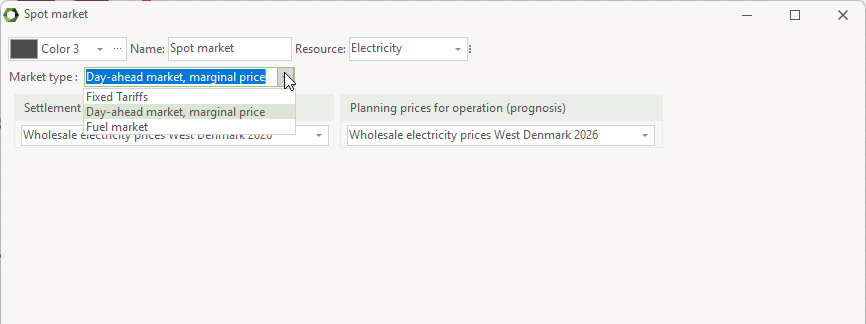
Fixed tariffs are tariffs such as the Danish triple tariff or a UK “Day and Night” tariff. “Spot Market” is used when optimization is based on fluctuating electricity spot market prices.
Saving and loading
If you choose to import an earlier saved setup of an “Electricity market” you can use this in your calculation or use it as a starting point, when you are editing data. Click on “Electricity market” in the left_hand vertical menu and choose “Load Electricity markets” from the tab that appears above. The imported data are shown in the window and can now be edited.
If you want to save data, you right click the electricity market you want to save and select save, and specify an expressive name of the file.
Fixed Tariffs
If a fixed tariffs market is chosen you need to define “Tariff element names” i.e., names of your tariff levels, and you need to define the market periods connected to the tariff element names.
Tariff element name
The year will often be divided into several periods, maybe hundreds or even more.
However, they are normally grouped into very few groups, e.g. Peak load periods, High load periods and Low load periods or Day tariff and Night tariff, as seen below. These groups are named “Tariff element names” and are added in the upper right table.
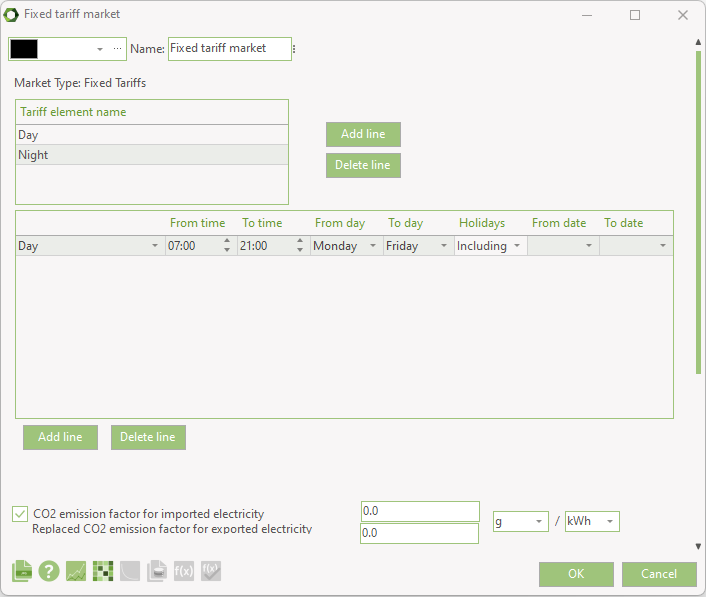
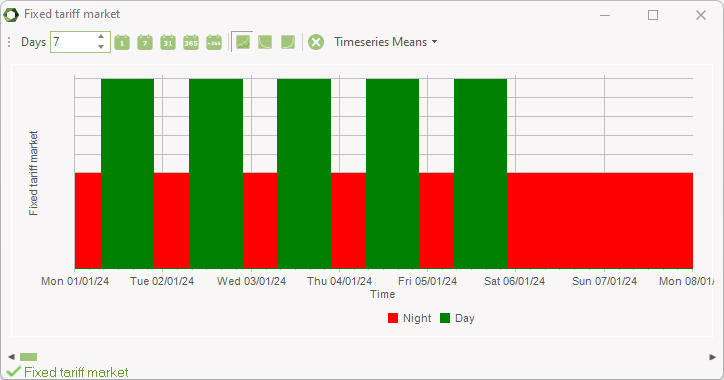
In the simple example shown above, the “Day tariff” is limited to the period from 07:00 to 21:00, Monday to Friday, including holidays. ALL other hours are then automatically defined as “Night tariff”.
In the lower table you define when the already specified “Tariff element name” are located within the year. A period is specified by one or more lines. It is allowed to make overlaps in the description, because the period, which is first in the Tariff element name-list (e.g. Day tariff) are selected first and hereby reserving the specified time span. The next periods on the list have only access to the time spans that are not already reserved by “Tariff element name" with higher priority.
Note: You cannot define periods for the last name, in this example "Night tariff". The residual periods that are not defined in the table are automatically allocated to the last “Tariff element name” in the example “Night tariff”.
If there are no dates specified for “From Date” and “To Date” the period are valid for the whole year.
A whole day is specified as from 00:00 to 00:00.
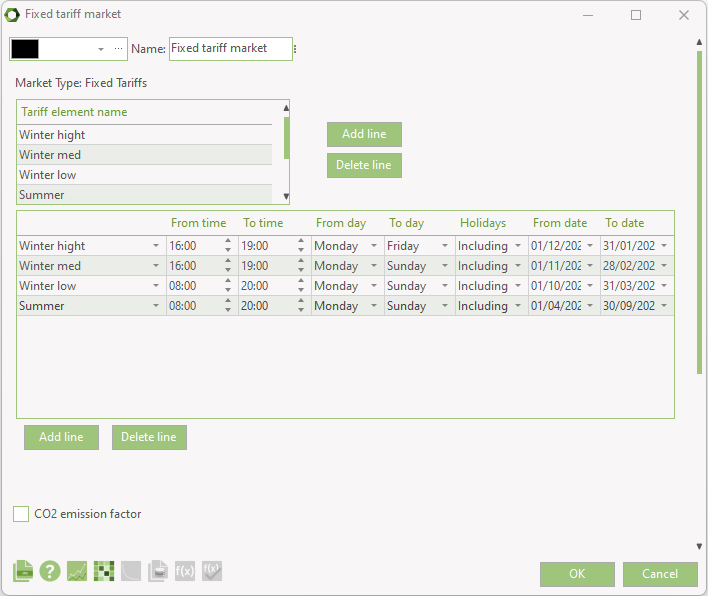
Above is a more complex example showing more defined and detailed tariffs covering various winter scenarios and summer, overlapping with a different time frames.
Day Ahead Market
On the day ahead you must select a time series or time series function containing day ahead prices. Note that the time series must first be established as an element in the External conditions section.
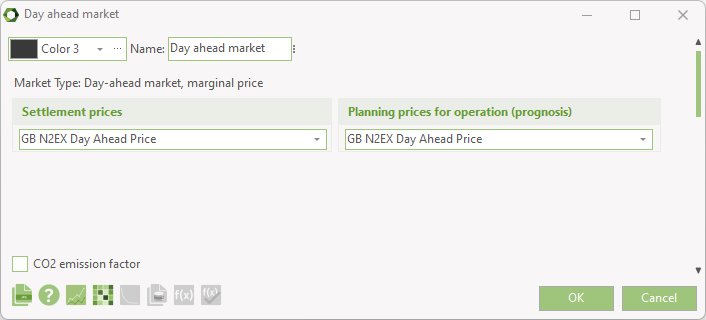
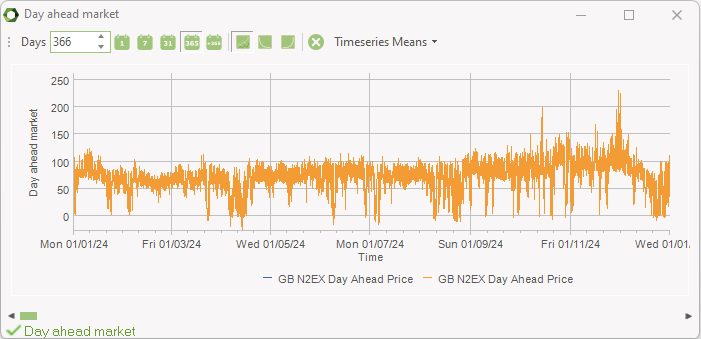
In the example above the time series has got the name “GB N2EX Day Ahead Price”, indicating that the time series is holding a set of electrical day ahead prices. The settlement price time series is used in the economic reports, showing the actual income or expenditures on exporting or importing electricity. The Planning prices for operation is used in the calculation. This can be used for including a time series with different values than the settlement prices and in that way avoid a too optimal result. If the time series are the same (default), then you assume full knowledge of the prices to come.
In the online data set, we have included historic time series with day ahead prices for various countries.
If you have a situation where one CHP engine is selling electricity into the day ahead market, while another CHP unit is selling electricity to a flat rate tariff, you will have to make another electricity resource. Similar if you have a day ahead market for your electricity production on CHP and a flat rate market for your electricity consumption. Or, you can have a day ahead market for one site and a fixed tariff market for the other site (requires REGION). In all cases add a new resource, name it e.g. electricity2 or electricityFixed. In previous versions of energyPRO this would require the MARKETS module.
More than one Market on a resource (MARKETS)
If you have an activated license to the energyPRO module MARKETS you will be able to have more markets on the same resource.
The number of markets is unlimited and the different types of markets can be combined. This can be used for simulating operation of the CHP, PV, Heat pump or BESS on both day-ahead market and balancing markets.
\(CO_2\) emissions
On the market you can specify the \(CO_2\) emission factor for importing the resource or the replaced \(CO_2\) emission for exporting.

The \(CO_2\) emission factor for importing is used both for when importing electricity and importing fossil based fuels.
The replaced \(CO_2\) emission factor for exporting is mainly used when exporting electricity, where the exported electricity replaces electricity that would otherwise be produced and thereby saves \(CO_2\) emissions.
Market restrictions
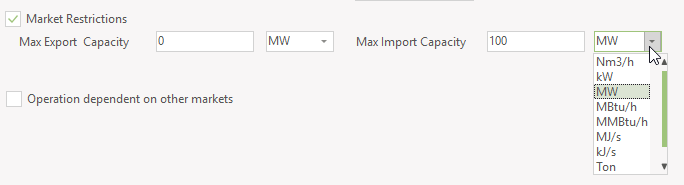
When enabling Market Restrictions you can set a limit on the export and import capacity.

It can be set as either a fixed value or as a time series with variating capacity restrictions.
The selection of measuring unit depends on the setting of units on the resource. In the case below, the market is on a resource, where the resource unit is Nm3 and where a calorific value is set. This mean you can select between the resource unit and the built-in energy units.
Operation dependent on other markets
With this feature you can avoid simultaneous exchange on more markets. It is mostly relevant when in MARKETS having more markets of the same resource and want to avoid simulationeous exchange, such as import on one market and export on the second market, thereby having no actual production or consumption.
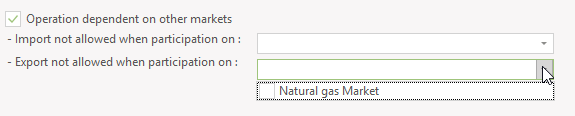
It can also be used on markets across types of resources as shown above.