Online Data Access
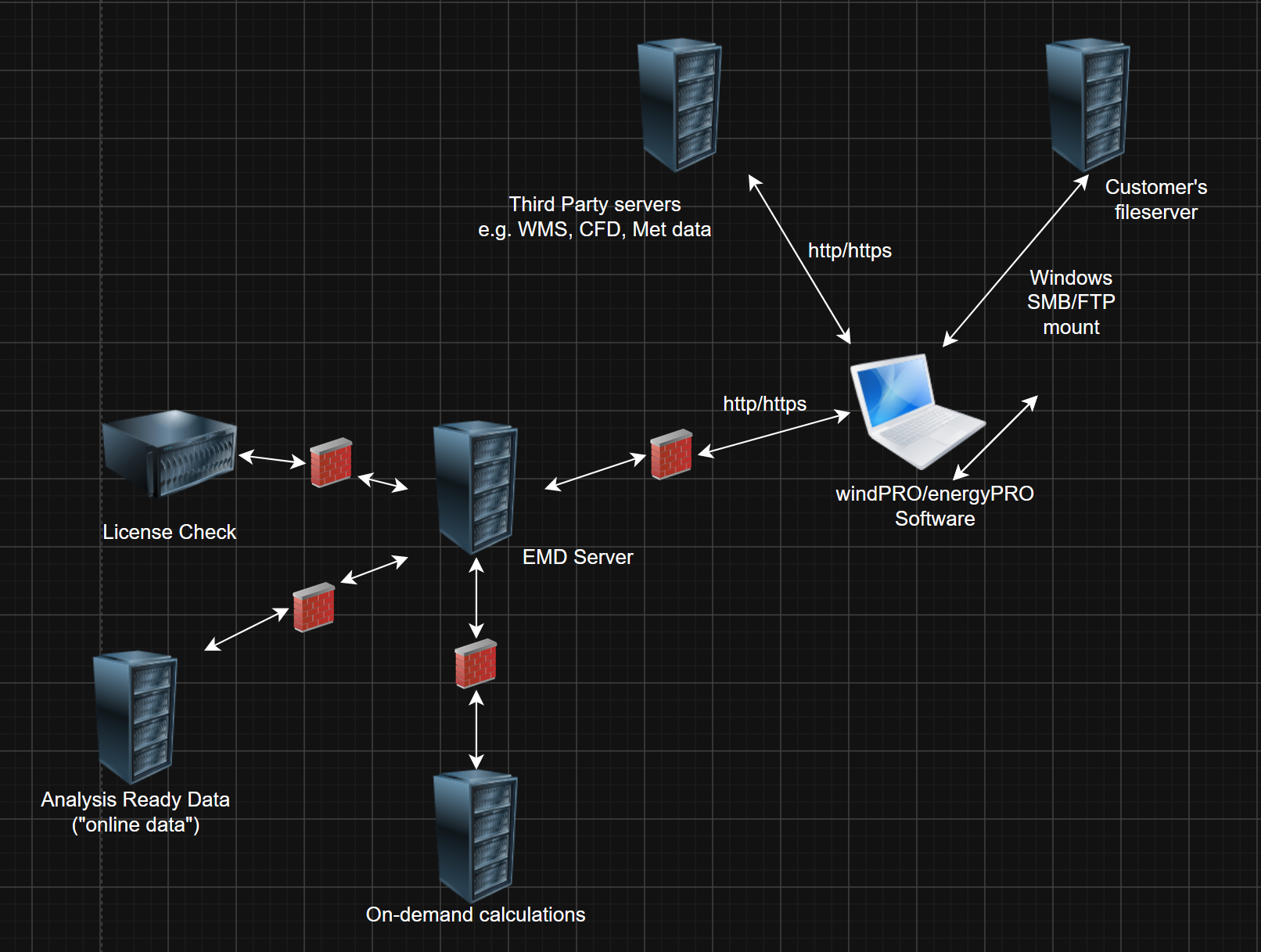
energyPRO offers a large variety of online data which can be downloaded directly from EMD using TCP/IP via HTTP (Port 80) or HTTPS (Port 443). Online access is also needed to validate the activation of the software. energyPRO needs access to:
- https://*.emd.dk
- http://*.emd.dk (Online Maps)
Listed as IP-address:
- onlinedata.emd.dk: 77.243.48.134
- api.energypro.dk: 77.243.48.132
energyPRO uses the procedures below to determine if the computer running energyPRO is online:
- Use Windows API procedure for online connectivity which basically checks if a network connection is active and connected
- If online, energyPRO downloads a test file from EMD: http://onlinedata.emd.dk/OnlineTestFromWindPRO.html
- If the OnlineTest-file exists, energyPRO validates the data integrity of the file using an MD5-checksum test
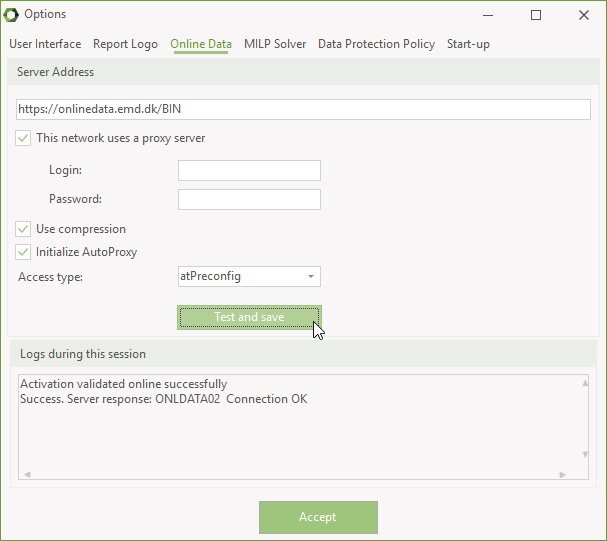
The default online data server URL is:
https://onlinedata.emd.dk/BIN
This URL can be changed in the energyPRO File -> Options -> Online data. Here you can also validate your network configuration:
Finally, energyPRO also requires access to the provider of the EMD security certificates and it may be necessary to add a firewall exception to “Let’s Encrypt”:
*.letsencrypt.org
If this site is not available, you may get an error message stating that “Revocation information is not available”.
IT Structure and Communication Diagram
Activation
To use the software, a software activation needs to be performed. Note that the activation requires online access to EMD Activation server – see the “Online data access”-section for details on this.
“Activating user” = The windows user who performs the activation in order to be able to use the software on the machine afterwards.
“EMD Activation server” = Dedicated machine at EMD International A/S for performing and administering software activations.
-
Information used for the activation
- Acquired automatically from Windows registry database during activation:
- Login-ID of activating user, based on the Windows User SID
- Windows name of activating user
- Device Name of the machine running the energyPRO software
- Input by activating user:
- License key provided by EMD
- Choice of modules (performed by activating user, based on modules available via license key)
- Acquired automatically from Windows registry database during activation:
-
Secondary information required during activation:
- Real name of activating user
- Email address of activating user (must be a real address, for sending activation code, see (3.g.iii))
-
Method of activation:
- User inputs License key provided by EMD (1.b.i)
- energyPRO software acquires license information from EMD Activation server:
- Customer number and address
- available modules
- amount of free modules
- energyPRO software acquires data in (1.a) from windows registry
- User inputs data in (2)
- User makes choice of modules (1.b.ii)
- energyPRO software sends data (3.b) to (3.e) to EMD activation server
- EMD Activation server
- marks activated modules as “used”
- calculates activation key from all provided data
- sends activation key to email address provided in (2.b)
- User inputs activation key, energyPRO validates it and writes it into windows registry (HKEY_CURRENT_USER\Software\EMD)
-
When launching energyPRO:
- energyPRO checks on EMD Activation server whether license has been voided or extended
- energyPRO calculates activation key from all data sent to activation server in step (3.f)
- energyPRO compares it to the key in windows registry from step (3.h)
- if they match, software can be used.
Note that if the activation cannot be validated on start-up, energyPRO initiates a 14 day grace period in which you can continue to use the software normally. After this, energyPRO reverts to demo mode.